Business systems
Your whole operation, in one connected system.
From verified opportunity data to the visit report: plan where your team goes, capture what happens on every visit and see performance as it happens.
One connected system
Everything your operation runs on, in one place.
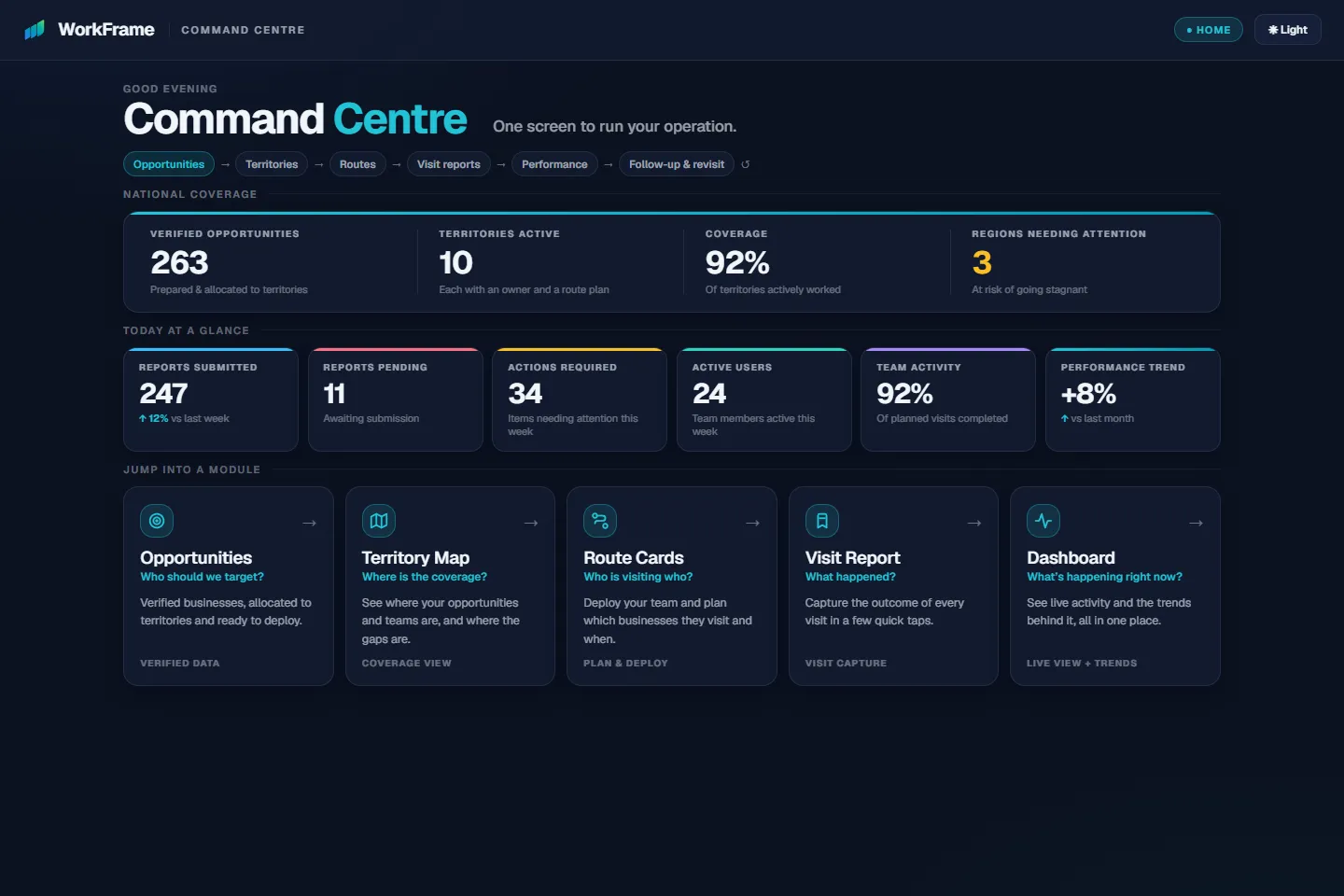
Opportunities, territories, routes, visit reporting and performance share one source of truth — overseen from a single Command Centre.
Verified opportunity data
It starts with knowing who to visit.
WorkFrame prepares target businesses for your sector, geography, territories and customer profile — then deploys them straight into the system your team works from.
“Verified” describes WorkFrame’s preparation and checking. Business details change over time, so verification reflects what could be checked at the time — and every visit report keeps the account current.
A raw list
- Rows to sort, clean and de-duplicate yourself
- No territories, owners or priorities
- Disconnected from what your team actually does
- Out of date the moment it is exported
WorkFrame verified opportunity data
- Sourced, cleaned, de-duplicated and categorised
- Organised geographically and allocated to territories
- Deployed into Route Cards for the field team
- Every visit reported against the same account
How it works together
Follow one account through WorkFrame.
The same business keeps the same record at every stage — from the moment it is prepared to the next action after the visit. Open any stage in the live system.
- 01 · Target businessWho should we target?Open Opportunities →
- 02 · TerritoryWho owns the opportunity?Open the Territory Map →
- 03 · RouteWhere should the rep go, and when?Open Route Cards →
- 04 · Visit reportWhat happened during the visit?Open the Visit Report →
- 05 · PerformanceWhat are we learning?Open Performance →
- 06 · Follow-upWhat happens next?See next actions →
BrightSmile Dental — Ashford is a fictional sample account; it appears with the same details in the live system.
What it solves
Structure for the work that happens outside the office.
- 01
Know who to target
Verified opportunities in the sectors and areas you want to reach — so the team starts with the right businesses.
- 02
Deploy with clarity
Each person gets a clear plan for the day, in a sensible order, with nothing to piece together.
- 03
Capture what happened
Every visit is recorded the same way, against the same account — outcomes, follow-ups and notes in one place.
- 04
Learn and act
Activity, trends and coverage gaps are visible as they happen, and every follow-up sets the next visit.
Industries
Built for the way service businesses work.
Whether you run a single location or teams across many sites, WorkFrame adapts to the way your business works.
Healthcare clinics
Coordinate opportunities, activity and performance across one or multiple clinics.
Dental practices
Keep reporting, operations and team activity connected across your practices.
Beauty salons
Keep teams and business visibility connected in one system.
Estate agencies
Organise opportunities, monitor activity and keep every branch aligned.
Hospitality
Coordinate teams, locations and daily operations without relying on spreadsheets.
Trades
Manage territories, jobs and team activity across your service areas.
FAQ
Frequently asked questions
Do I need every module from day one?
No. Most businesses start with visibility — visit reporting and the Dashboard — and add opportunity data, territories, Route Cards and the Command Centre as they grow. You never have to take the whole system at once.
What is Verified Opportunity Data?
Target businesses prepared for the sectors and areas you want to reach: sourced, cleaned, de-duplicated, organised by geography and checked, then allocated to territories and deployed into Route Cards. Verification reflects what could be checked at the time — business details change, and every visit report keeps the account up to date.
Can WorkFrame be used in any industry?
Yes. The same system serves service businesses of many kinds — clinics, dental practices, salons, estate agencies, hospitality, trades and franchises.
How is WorkFrame different from a dashboard?
A dashboard only shows information. WorkFrame covers the whole operation — planning where your team goes, guiding their visits, capturing what happened — and the Dashboard shows the results of that work.
Do I need to replace my existing systems?
Not necessarily. WorkFrame is set up around the way you already work, and can sit alongside the tools you use today. Talk to us about your setup.
Can WorkFrame scale nationally?
Yes. WorkFrame is built for multiple teams, territories and regions, all overseen from one Command Centre.
Let’s talk about your operation.
Tell us how your team works today — who you target, how you cover your territories and how visits are reported. We’ll show you where WorkFrame fits.